Steel Clip
Clean peak control
Clean, controlled clipping for peak management and clear loudness. Strong starting point for kicks and mix-bus safety. Character steers knee width / edge direction.
CCN / Effect
Cobalt
Clipper Neo Free
A saturation and clipping plugin for club music, electronic production, and mix / pre-master work. Shape density and peaks on drums, 808s, bass, synths, buses, and pre-masters with five Types, Drive / Character / Tone, and a final Ceiling stage separate from the tone-shaping clip path.
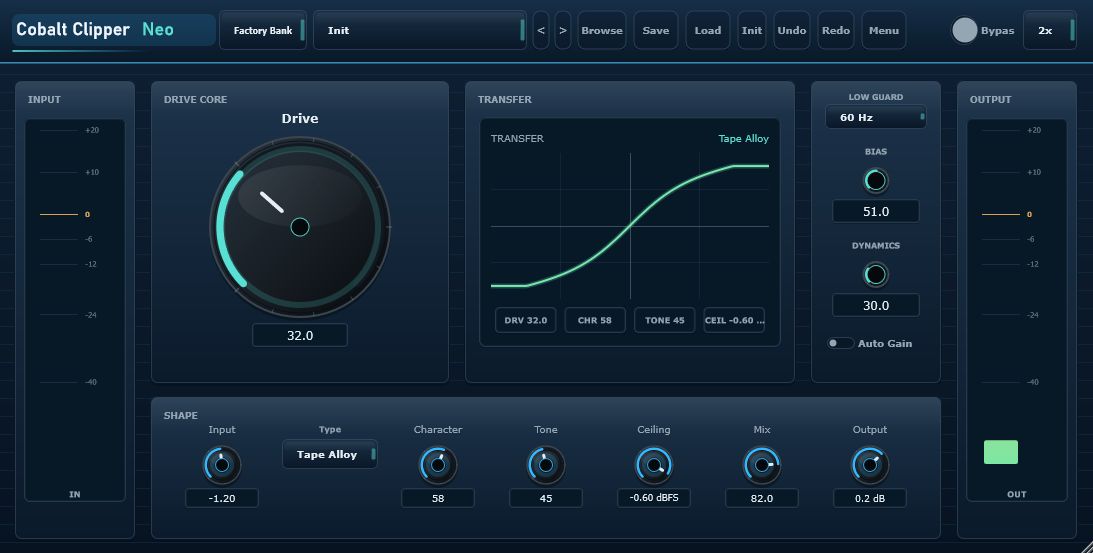
Drive Core
Choose direction with Type, shape tone with Drive / Character / Tone, then set density and final level with Ceiling / Mix / Output. Tone-shaping clip stages inside each Type stay separate from the final Ceiling stage.
Steel Clip
Clean, controlled clipping for peak management and clear loudness. Strong starting point for kicks and mix-bus safety. Character steers knee width / edge direction.
Cobalt Lift
Density and presence lift with restrained harmonics - useful when a lead or bus needs forwardness without heavy dirt. Character steers density / presence.
Club Heat
Warm asymmetric saturation for drums, synths, and bus dirt / heat. Bias and Character open the heat / dirt direction further.
Bass Forge
Sub-safe bass harmonics for 808s and low-end speaker weight. Pair with Low Guard (default 60 Hz) to protect the sub. Character steers growl / body.
Tape Alloy
Light glue and rounded transients for buses and pads. A practical starting Type for drum-bus density. Character steers glue direction.
Visual feedback
Input / Output meters, Clip Reduction at the Final Ceiling stage, and a Transfer Curve guide help you shape density while listening.
Screen layout
The window is based on a 1100 x 560 design canvas and scales from 75% to 200% with a fixed aspect ratio. A practical path is Type first, then Drive / Character / Tone, then Ceiling / Mix / Output.
Header
Factory / User banks, Browser, Save / Load / Init, Undo / Redo, Menu, Bypass, and Oversampling.
Drive Core
Type, Drive, Character, and Tone sit center-left for the main saturation decision.
Transfer
Transfer Curve and related chips show how the active Type is shaping the signal.
Output
Final density and level controls with Output meter and Clip Reduction readout.
Sound design path
01
Start with Steel Clip for peaks, Bass Forge for 808s, Tape Alloy for bus glue, or Club Heat for dirt.
02
Begin around 20-50%. Drive is the main distortion control; raise it with Ceiling in mind.
03
Character steers Type-specific tone. Tone tilts bright or dark. Bias and Dynamics refine asymmetry and response.
04
Lower Ceiling for density and impact, try Mix around 70-95% for punch, then match loudness with Output.
| Kick peak control | Steel Clip - do not over-lower Ceiling; check click. |
|---|---|
| 808 / sub bass | Bass Forge - Low Guard 60-120 Hz; check sub integrity. |
| Drum-bus glue | Tape Alloy - medium Drive; add density with Ceiling. |
| Mix bus / pre-master | Steel Clip / Tape Alloy - conservative Drive; start with a shallow Ceiling. |
Specifications
| Product | Cobalt Clipper Neo Free |
|---|---|
| Version | 0.9.0 |
| Supported OS | Windows 11 64-bit recommended / Windows 10 64-bit or later |
| Formats | VST3 / CLAP (experimental) |
| Types | Steel Clip / Cobalt Lift / Club Heat / Bass Forge / Tape Alloy |
| Oversampling | Off / 2x / 4x (default 2x) |
| GUI canvas | 1100 x 560, scalable 75-200% |
| Distribution | Free plugin / zip package (no installer) |
| Developer | Synth Studio Neo / Built with JUCE 8 |