Clean
More transparent control
Relatively gentle attack / release for master and bus work where you want peak control without a heavy character change.
CLN / Effect
Cobalt
Limiter Neo
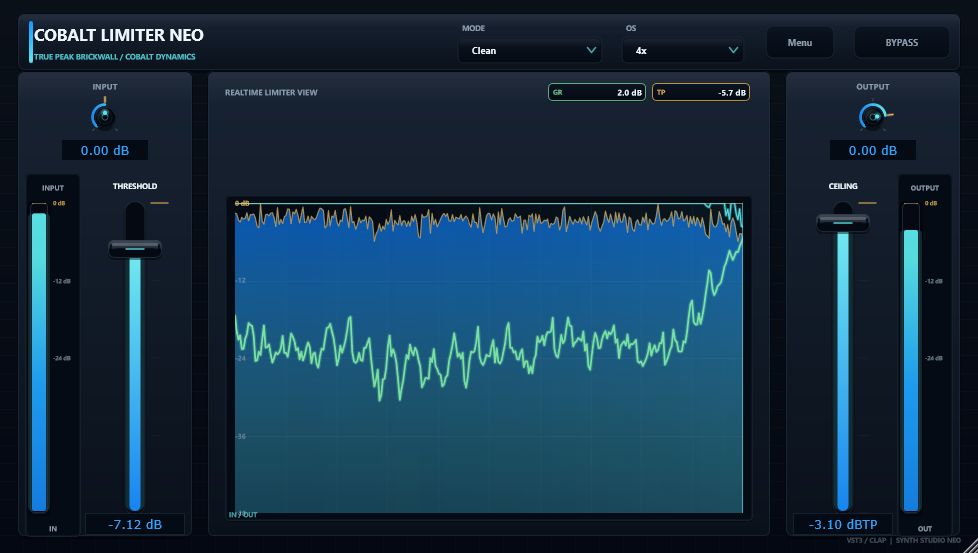
A mono/stereo brickwall limiter for peak control on mix buses, master buses, and individual tracks. Keep peaks within a Ceiling while watching input, output, and gain reduction in REALTIME LIMITER VIEW. Switch Clean for transparent control or Aggressive for denser, punch-oriented response.
Character and timing
Set the output ceiling with CEILING, set reduction amount with THRESHOLD, then switch MODE and detector oversampling as needed. THRESHOLD / CEILING faders share the same dB scale as the meters and central graph.
REALTIME LIMITER VIEW keeps the limiter honest. Watch cyan-style input and output traces, a lime-style GR trace, and a live GR readout while you work. The 0 dB line is highlighted so Ceiling and Threshold decisions stay readable under pressure.
Clean
Relatively gentle attack / release for master and bus work where you want peak control without a heavy character change.
Aggressive
Faster timing with pre / post soft clipping for drums and buses that need stronger transient control or more punch.
Lookahead
Lookahead is fixed at 3 ms and reported to the host as plugin latency. Enable host latency compensation in your DAW.
OS
Off / 2x / 4x peak-detector oversampling. Default is 4x for master-bus work; drop to 2x or Off to reduce CPU load.
| Attack | Clean about 0.14 ms / Aggressive about 0.05 ms |
|---|---|
| Release | Clean about 300 ms / Aggressive about 88 ms |
| Safety margin | Clean about -0.65 dB / Aggressive about -0.12 dB |
| Soft clip | Aggressive adds pre-limit and ceiling soft clip stages; Clean stays pass-through. |
Realtime feedback
The GUI is based on a 980 x 560 canvas and scales from 75% to 200%, keeping meters, faders, and REALTIME LIMITER VIEW aligned on one readable layout.
Left
Input meter and Threshold fader set how hard the limiter works against the incoming signal.
Center
Level axis from 0 dB to -48 dB with cyan-style input / output traces, lime-style GR, and a live GR readout to one decimal place.
Right
Output meter, Ceiling, and Output gain finish the chain. Default Ceiling is -1.00 dB.
Quick start
Master
Insert near the end of the master bus, enable latency compensation, set CEILING around -1.00 dB, leave OS at 4x, start in Clean, then lower THRESHOLD only as far as you need.
Tracks / buses
Use on drum buses, vocals, and leads. Set CEILING to the track target, shape transients with THRESHOLD, and try Aggressive when you want faster response or more density.
Drift Neo FX
Inside Drift Neo it also serves as peak control and a safety tool during sound design - not advanced loudness processing dedicated to final mastering.
Specifications
| Product | Cobalt Limiter Neo |
|---|---|
| Version | 0.9.0 |
| Supported OS | Windows 11 64-bit recommended / Windows 10 64-bit or later |
| Formats | VST3 / CLAP (experimental) |
| Modes | Clean / Aggressive |
| Lookahead | Fixed 3 ms (reported as host latency) |
| Detector OS | Off / 2x / 4x (default 4x) |
| GUI canvas | 980 x 560, scalable 75-200% |
| Developer | Synth Studio Neo / Built with JUCE 8 |