Cobalt Core
Ladder character with Drive
Ladder-filter-based processing with Drive saturation inside the filter, Cobalt Color (Now / Vintage), and automatic resonance-linked makeup. Slope steps: 6 / 18 / 24 dB per octave.
CFN / Effect
Cobalt
Filter Neo
A mono/stereo filter for sound shaping, tone control, and creative filter movement. Choose Cobalt Core for ladder character with Drive and Cobalt Color, or Clean Core for straightforward filtering. Switch LPF / HPF / BPF and slope, then place it as a standalone effect or inside Drift Neo's FX rack.
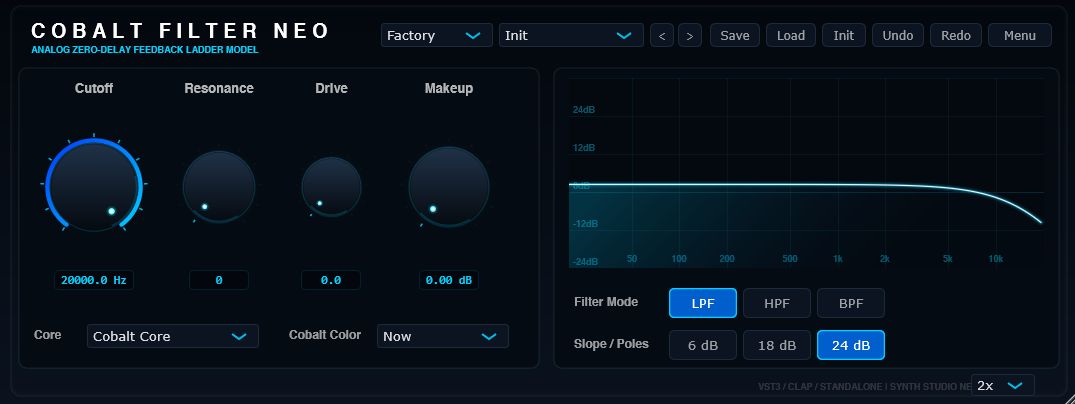
Filter cores
Core selects the processing path. Cobalt Core is ladder-based and character-rich when you add Resonance and Drive. Clean Core stays straightforward when you want cutoff and resonance without nonlinear color.
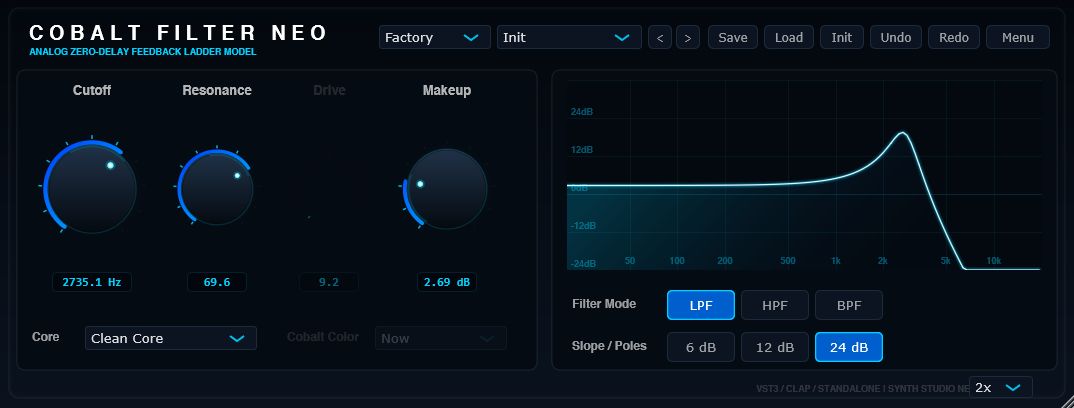
Cobalt Core is the character path. Raise Resonance and Drive for denser ladder tone, then choose Cobalt Color: Now for a modern, clear Cobalt feel, or Vintage for slight cutoff drift and richer tone shaping. Resonance-linked makeup helps keep output level usable as resonance climbs.
Cobalt Core
Ladder-filter-based processing with Drive saturation inside the filter, Cobalt Color (Now / Vintage), and automatic resonance-linked makeup. Slope steps: 6 / 18 / 24 dB per octave.
Clean Core
A cleaner response path without nonlinear drive or Cobalt Color. Drive and Cobalt Color controls are disabled. Slope steps: 6 / 12 / 24 dB per octave.
Cobalt Color
Available with Cobalt Core only. Now is the default modern Cobalt tone. Vintage adds slight cutoff drift and richer shaping. Switching Core or Color resets internal filter state.
Response graph
The upper-right graph shows frequency response from 20 Hz to 20 kHz as you move Cutoff, Resonance, Mode, and Slope. With high Drive or Resonance on Cobalt Core, treat it as a guide rather than an exact output match.
Mode and slope
Choose Filter Mode first, set Slope for rolloff steepness, then shape tone with Cutoff and Resonance. Higher Slope values steepen attenuation near cutoff and tend to emphasize Resonance peaks.
LPF
Cut highs for warm tone and bass processing. A natural starting point for synth and bass filters.
HPF
Cut lows for kick cleanup, low-end control, and high-pass sweeps.
BPF
Pass a focused band for radio tone, drum focus, and narrow-band movement.
| Cobalt Core | 6 dB / 18 dB / 24 dB per octave (default 24 dB) |
|---|---|
| Clean Core | 6 dB / 12 dB / 24 dB per octave (default 24 dB) |
| 6 dB | Gentlest rolloff for natural tone shaping |
| 24 dB | Steepest rolloff for pronounced filter effects |
Sound design path
01
Start with LPF for warmth, HPF for cleanup, or BPF for focused bands. Set Slope for how hard the edge hits.
02
Use Cobalt Core when you want Drive and Color. Use Clean Core for EQ-style filtering without saturation.
03
Move Cutoff on the log scale (1 kHz near center). Raise Resonance for peaks; add Drive on Cobalt Core.
04
Match output level with Makeup. On Cobalt Core, manual makeup sits on top of resonance-linked compensation.
| Bass / synth LPF | Cobalt Core + Now - start from Acid Bass or Warm LPF. |
|---|---|
| Kick / low-end cleanup | Clean Core or Cobalt Core HPF - see Kick Cleanup. |
| Clean EQ-style filtering | Clean Core - when Drive is not needed. |
| Narrow-band drums | Cobalt Core + Now BPF - see Drum Radio. |
Specifications
| Product | Cobalt Filter Neo |
|---|---|
| Version | 0.9.0 |
| Supported OS | Windows 11 64-bit recommended / Windows 10 64-bit or later |
| Formats | VST3 / CLAP |
| Cores | Cobalt Core / Clean Core |
| Modes | LPF / HPF / BPF |
| Slope | Cobalt Core 6 / 18 / 24 dB / Clean Core 6 / 12 / 24 dB |
| Oversampling | Off / 2x (default 2x) |
| GUI canvas | 1080 x 414, scalable with fixed aspect ratio |
| Editions | Demo / Full / zip package (no installer) |
| Developer | Synth Studio Neo / Built with JUCE 8 |